
Bridging the Snapmaker J1S to the Moonraker Ecosystem
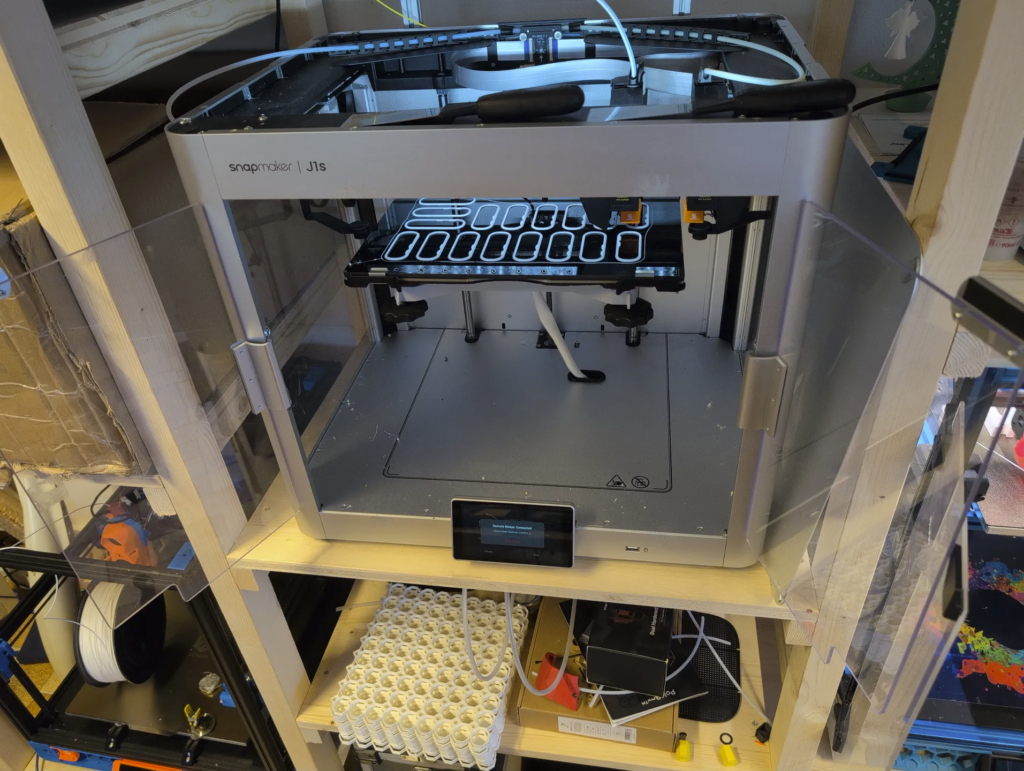
At 3D Etplus, we operate a fleet of 3D printers daily. Most of them share a common workflow: slice in PrusaSlicer, send the GCode to the printer over the network, and monitor the job from a Mainsail dashboard — all powered by the Moonraker API. Our Snapmaker J1S, however, is the odd one out. It uses Snapmaker’s proprietary protocol and its own closed ecosystem of software, meaning we can’t slice in PrusaSlicer and send a file straight to the printer, can’t monitor it from the same dashboard as everything else, and can’t plug it into the fleet management tools we depend on.
This post details how we built snapmaker_moonraker — an open-source bridge that makes the Snapmaker J1S behave like a Klipper printer, controllable from standard Moonraker-compatible tools and directly addressable from PrusaSlicer’s network print dialog. The project is available on GitHub under the MIT license.
The Starting Point: sm2uploader
This project wouldn’t exist without sm2uploader by macdylan, a Go-based command-line tool for uploading files to Snapmaker printers. sm2uploader (itself building on earlier work by kanocz) provided the critical foundation: a working implementation of Snapmaker’s SACP (Snapmaker Application Communication Protocol) binary protocol in Go, including the TCP handshake, packet encoding/decoding, CRC checksums, file upload chunking, and UDP printer discovery.
sm2uploader proved that it was possible to talk to a Snapmaker printer from custom software without Luban. The question was: could we take that protocol knowledge and wrap it in a Moonraker-compatible API, so that the J1S looks like any other Klipper printer to the tools we already use — starting with PrusaSlicer’s ability to send GCode files directly to a Moonraker host?
The Problem: One Printer, Two Worlds
Our daily workflow for every other printer is straightforward: slice a model in PrusaSlicer, hit the network send button to upload the GCode to the printer’s Moonraker instance, then monitor the print from Mainsail. The Snapmaker J1S breaks this chain completely. It speaks only SACP — a proprietary binary protocol over TCP — and exposes no standard interfaces. There is no Moonraker API, no OctoPrint compatibility, and no way to integrate it into a Klipper-based fleet.
This means no sending files from PrusaSlicer, no Mainsail dashboard, no unified fleet view, and no way to plug the J1S into the same monitoring and management pipeline as our other machines.
The Solution: A Go-Based Protocol Bridge
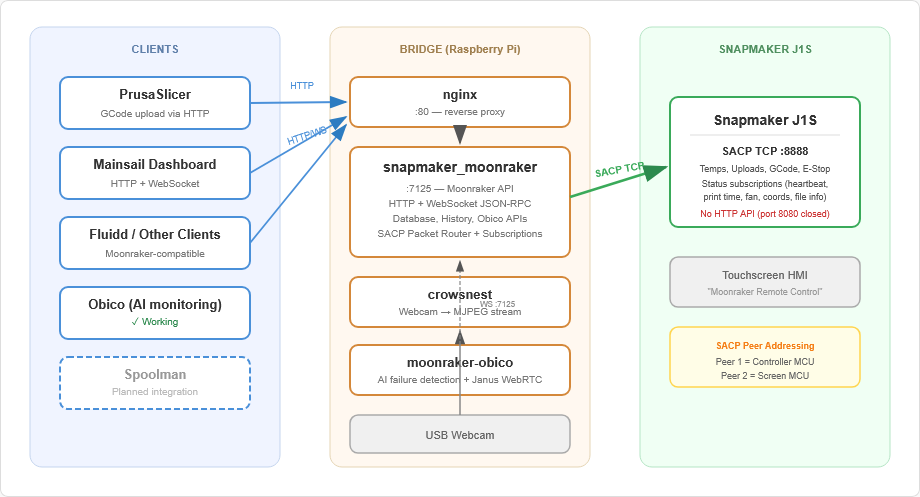
Building on sm2uploader‘s SACP protocol code, we wrote a bridge application in Go that sits between standard Moonraker clients and the Snapmaker printer. It exposes a full Moonraker-compatible HTTP and WebSocket API on port 7125 — the same port real Moonraker uses — and translates every request into SACP binary protocol commands sent to the printer over TCP.
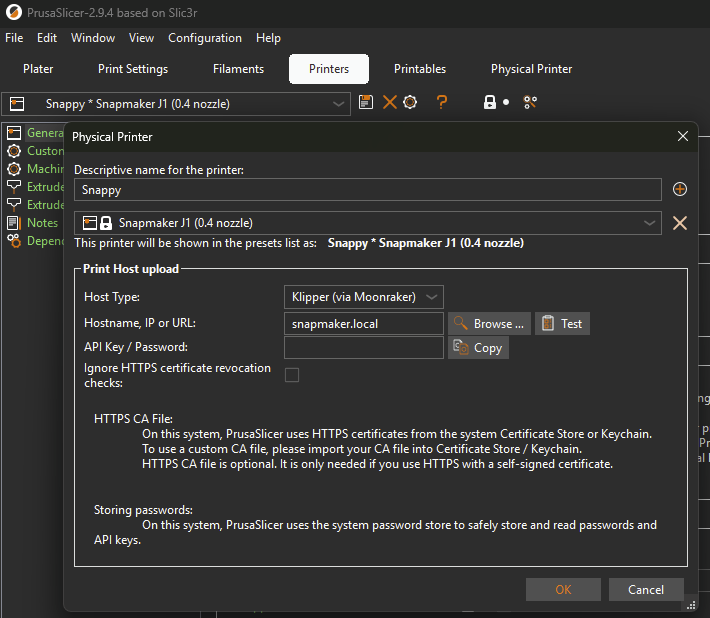
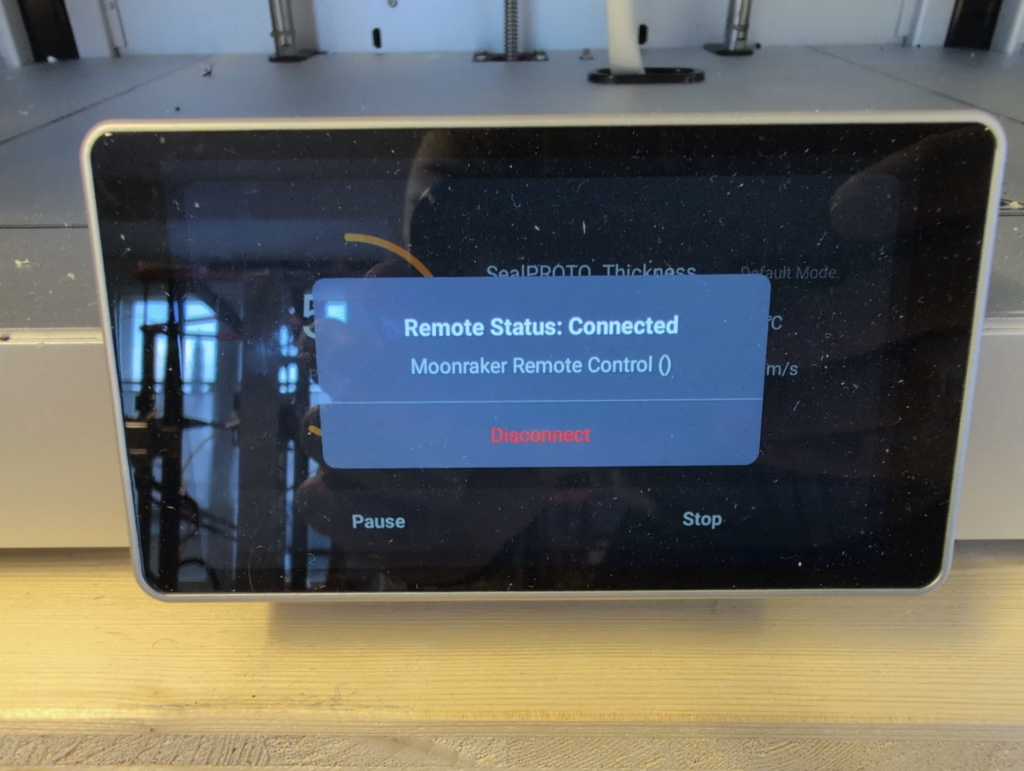
From PrusaSlicer’s perspective, the bridge is just another Moonraker host. You configure it as a network printer, and the “Send to printer” button works exactly as it does for any Klipper machine. The bridge receives the uploaded GCode, transfers it to the J1S over SACP, and can start the print — all without touching Luban.
Everything goes through a single protocol:
- SACP over TCP (port 8888) — The J1S’s only network interface. Used for the connection handshake, temperature queries, file uploads, print status subscriptions, coordinate tracking, fan monitoring, GCode execution, homing, and emergency stop.
[PrusaSlicer / Mainsail / Fluidd] <--HTTP/WebSocket--> [Bridge :7125] <--SACP TCP:8888--> [J1S Printer]We initially assumed the J1S would also expose a REST API on port 8080, as documented for older Snapmaker models. A port scan during real-world testing quickly disproved that — port 8080 is closed on the J1S. This meant everything had to go through SACP, which turned out to be a significant engineering challenge but ultimately produced a cleaner, more reliable architecture.
Reverse-Engineering the SACP Protocol
sm2uploader gave us the basics — connection, file uploads, and discovery — but it doesn’t query temperatures, subscribe to print status, or read coordinates. Those features had to be built from scratch by reverse-engineering the SACP binary protocol using the SnapmakerController-IDEX firmware source code and the Luban desktop application.
Temperature Queries
The J1S doesn’t respond to standard GCode temperature queries (M105) over SACP; it returns empty responses. We had to send SACP command packets directly (CommandSet 0x10 for extruders, 0x14 for the heated bed) and parse the binary response data.
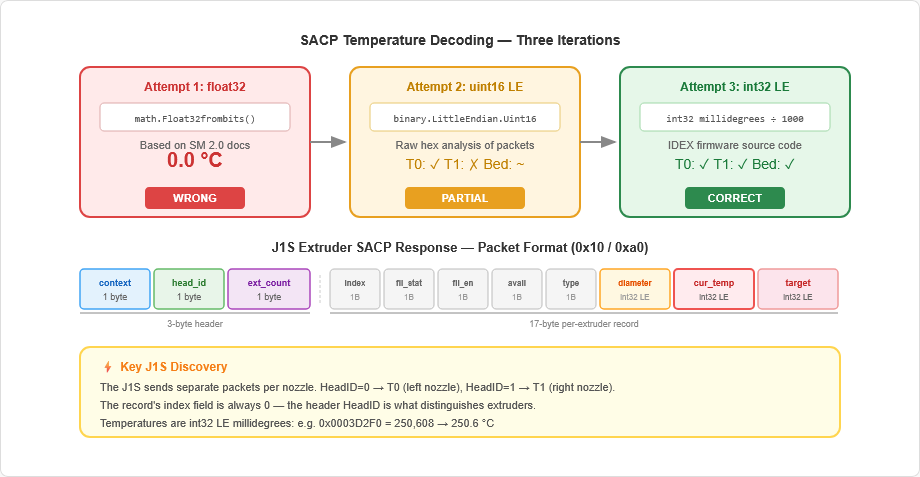
Getting the temperature encoding right took several iterations of reverse engineering:
- First attempt: float32 encoding — Based on Snapmaker 2.0 documentation. Result: 0.0°C across the board. Wrong format.
- Second attempt: uint16 millidegrees — Based on raw hex analysis of captured packets. Partially worked — one nozzle read correctly, the other didn’t.
- Third attempt: int32 millidegrees — After studying the SnapmakerController-IDEX firmware source code, we found the actual encoding: signed 32-bit integers in little-endian byte order, representing millidegrees Celsius (divide by 1000 for °C).
Another discovery specific to the J1S: the dual-extruder printer sends separate SACP packets per nozzle, identified by a HeadID byte in the packet header. The per-extruder record index is always zero — it’s the header that distinguishes left (T0) from right (T1). Our packet router merges these into a unified temperature state.
Print Status via SACP Subscriptions
With no HTTP API available, getting print status, progress, and machine state required implementing SACP’s subscription mechanism. The bridge subscribes to periodic data feeds from the printer’s firmware by sending subscription requests (CommandSet 0x01, CommandID 0x00) with the target data type and a polling interval.
We implemented subscriptions for:
- Machine heartbeat (0x01/0xA0) — 11 distinct states from IDLE to COMPLETING, mapped to Klipper’s standby/printing/paused model.
- Print elapsed time (0xAC/0xA5) — Seconds since print start, as a uint32.
- Current print line (0xAC/0xA0) — GCode line number for progress tracking.
- Fan status (0x10/0xA3) — Per-nozzle fan speed, mapped to Moonraker’s 0.0–1.0 scale.
- XYZ coordinates (0x01/0x30) — Axis positions in microns (int32 LE, ÷1000 for mm).
- File info (0xAC/0x00 and 0xAC/0x1A) — Currently printing filename, queried from both the controller and screen MCU.
A key discovery was that the J1S has two addressable “peers” on the same TCP connection: the controller (Peer ID 1) and the touchscreen MCU (Peer ID 2). Some data — like the printing filename and total line count — is only available from the screen MCU.
What the Bridge Can Do Today
After eight development sessions and extensive real-printer testing, the bridge supports a comprehensive set of Moonraker features:
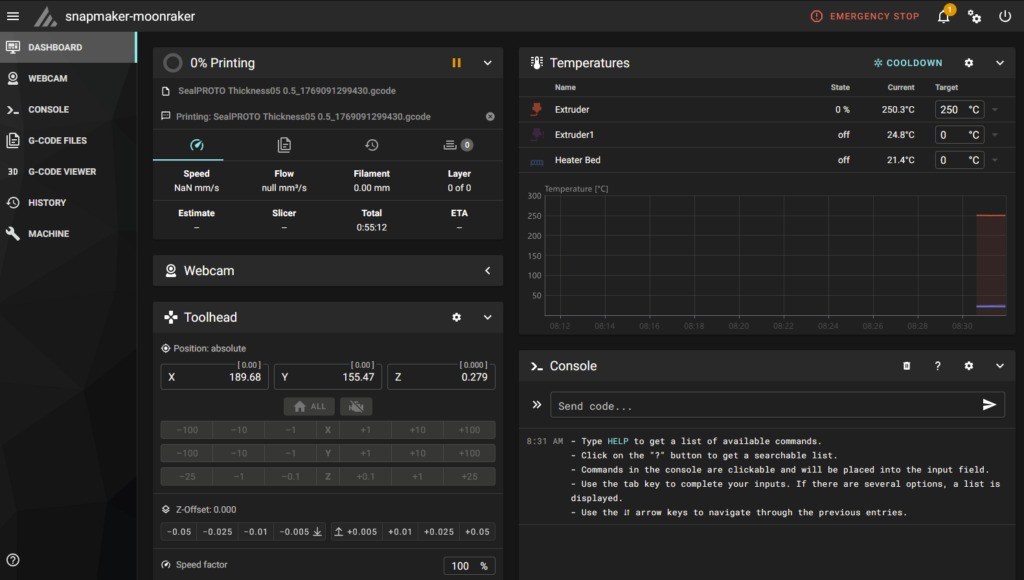
- PrusaSlicer network printing — Configure the bridge as a Moonraker host in PrusaSlicer and send GCode files directly to the J1S over the network.
- Real-time temperature monitoring — Dual extruders and heated bed, polled via SACP binary queries and displayed in Mainsail’s temperature graph.
- Print status tracking — Machine state (idle/printing/paused/completing), filename, elapsed time, and fan speed — all via SACP subscriptions with live updates.
- Live position tracking — XYZ toolhead coordinates and homed axes status, updated in real time.
- Temperature control — Set target temperatures for both extruders and the heated bed.
- GCode execution — Send arbitrary GCode commands via the Mainsail console.
- File management — Upload, list, download, and delete GCode files. Metadata extraction from slicer comments.
- Print control — Start, pause, resume, and cancel prints from the Mainsail interface.
- Emergency stop — M112 support for immediate printer halt.
- Printer discovery — UDP broadcast discovery to find Snapmaker printers on the local network.
- Database API — Key-value storage with namespace support, persisted to JSON files.
- Print history — Job tracking with start/end times, duration, and cumulative statistics.
- WebSocket subscriptions — Full JSON-RPC 2.0 support with live status updates, matching Moonraker’s subscription model.
- Obico AI print monitoring — Full compatibility with moonraker-obico, verified working against a self-hosted Obico server for AI-powered print failure detection.
There is one known limitation: print progress percentage stays at 0% for prints started from the touchscreen. The screen MCU query that provides the total line count (needed for percentage calculation) times out on the J1S for touchscreen-initiated prints. Prints started via Mainsail/PrusaSlicer do not have this issue, as the bridge knows the total line count from the uploaded file.
Turnkey Deployment: Raspberry Pi Image with Webcam Support
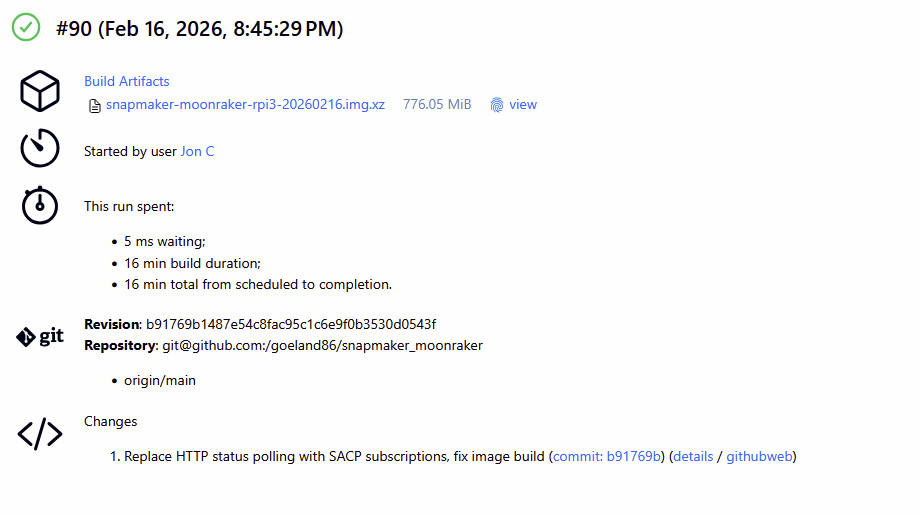
To make deployment as simple as possible, we built a CI pipeline that produces a ready-to-flash Raspberry Pi 3 SD card image. The Jenkins pipeline cross-compiles the Go binary for ARMv7, downloads Raspberry Pi OS Lite, mounts the image in a QEMU-emulated ARM chroot, and installs everything:
- nginx as a reverse proxy, serving Mainsail on port 80 and proxying API/WebSocket traffic to the bridge on port 7125.
- Mainsail — the latest release, pulled automatically from GitHub during the image build.
- snapmaker_moonraker — running as a systemd service with automatic restart on failure.
- crowsnest — the Mainsail-crew’s webcam daemon, providing camera streaming for live print monitoring directly in the Mainsail dashboard. With a USB webcam plugged into the Pi, you get a live view of the print bed alongside temperatures and progress — the same setup used on our Klipper machines.
- moonraker-obico — pre-installed and configured for AI-powered print failure detection. Connects to a self-hosted Obico server with Janus WebRTC streaming for low-latency video.
- SSH enabled for remote management, hostname set to
snapmaker.
[Browser] → [nginx :80] → [Mainsail static files]
                        → proxy_pass → [snapmaker_moonraker :7125]
                                            ↓
                                  [Snapmaker J1S via SACP TCP:8888]

[USB Webcam] → [crowsnest] → [MJPEG/WebRTC stream] → [Mainsail webcam panel]
                            → [Janus WebRTC] → [Obico AI failure detection]
Flash the image, boot the Pi, plug in a USB webcam, point your browser at http://snapmaker.local, and you’ve got a fully functional Mainsail dashboard with live video and AI print monitoring for your J1S. The entire build process is automated and produces compressed images ready for GitHub Releases.
Automated CI produces flashable SD card images with every tagged release.Key Design Decisions
Why Go? Go’s excellent cross-compilation support was critical. A single GOOS=linux GOARCH=arm command produces a statically linked ARM binary — no runtime dependencies, no interpreter, no library versioning issues on the Pi. Go’s built-in concurrency primitives (goroutines, channels, mutexes) also made the asynchronous SACP packet routing straightforward — the bridge runs a dedicated packet router goroutine that demultiplexes incoming SACP responses to waiting callers via per-sequence-number channels.
Why vendor sm2uploader’s SACP code? sm2uploader is a standalone program (Go’s package main), which means it can’t be imported as a library by other Go projects. Rather than forking and restructuring someone else’s project, we vendored the protocol-level code into a clean sacp/ package, extended it heavily with temperature parsing, subscription management, multi-peer addressing, and status decoding, and gave full attribution to both macdylan and kanocz.
SACP-only architecture: We initially planned a dual-protocol approach — SACP for binary operations and the Snapmaker HTTP API for GCode execution and status polling. Real-world testing revealed that the J1S has no HTTP API at all (port 8080 is closed). This forced a complete rewrite to route everything through SACP, including print status via the subscription mechanism and GCode execution via SACP command packets. The result is actually cleaner: a single TCP connection handles all communication, and the subscription-based status updates are more efficient than periodic HTTP polling would have been.
State/StateData split pattern: Go’s sync.RWMutex cannot be safely copied by value, but we needed to pass snapshots of printer state around freely. The solution was to separate the mutable, mutex-protected State container from the plain StateData value type. A Snapshot() method returns a safe copy of the data without the lock.
What’s Next: Completing Fleet Integration
The bridge today gives us the core workflow we wanted: slice in PrusaSlicer, send to the J1S over the network, monitor the print in Mainsail with a live webcam feed, and get AI failure detection from Obico. The larger objective — to fully unify the network management of the Snapmaker with the rest of the 3D printers 3D Etplus operates daily — is well underway. The remaining integration target is:
- Spoolman for filament tracking — Tracking spool usage, remaining filament, and material types across all printers, including the J1S. This is essential for a multi-printer operation where knowing how much filament is left on each spool saves time and prevents mid-print runouts.
This integration isn’t yet complete, but it is the natural next milestone for the project. Achieving it will mean the J1S is a fully equal citizen in our print farm — monitored, managed, and tracked through the same tools as every other machine. We’ll cover the Spoolman integration work in a follow-up post.
There are also several technical improvements on the roadmap:
- Resolving the 0% progress issue for touchscreen-initiated prints.
- Improving SACP connection reliability (the initial connect occasionally times out, though auto-reconnect recovers quickly).
- Token refresh and persistence (currently, the authentication token must be confirmed manually at the printer’s touchscreen and is lost on power cycle).
- End-to-end testing of the full PrusaSlicer → upload → print → monitor → complete workflow.
Open Source & AI Disclosure
The snapmaker_moonraker project is released under the MIT License and is available on GitHub. It builds directly on the SACP protocol work from sm2uploader (MIT License) by macdylan and snapmaker-sm2uploader by kanocz — without their prior reverse engineering of the Snapmaker protocol, this project would not have been feasible. Contributions and feedback are welcome.
In the spirit of transparency: this project was developed with assistance from Claude (Anthropic). The architecture, code structure, and implementation were produced through human-AI collaboration — a workflow we’ve found remarkably effective for this kind of protocol-level systems programming that leveraged existing open source projects that handled individual parts of the required tasks.
Stay tuned for Part 2, where we’ll tackle Spoolman filament tracking integration for the Snapmaker J1S.